Sticker Maker - Sticker Vibe: Unleash Your Creativity
Screenshots


Introduction
Sticker Maker - Sticker Vibe is an innovative application developed by TinyPeak Studio that allows users to create custom stickers for popular messaging platforms like WhatsApp and Telegram. With the version 2.1.0.0526, this app serves as a perfect solution for those tired of using the same old emojis and stickers. It empowers users to express their emotions and creativity through personalized stickers that can be easily designed and shared. The app offers a user-friendly interface that simplifies the sticker creation process, allowing you to turn your favorite photos into unique stickers while incorporating text, emojis, and various customization options. Whether you are looking to add a personal touch to your chats or simply want to have some fun, Sticker Maker – Sticker Vibe has you covered!
Graphics & Gameplay
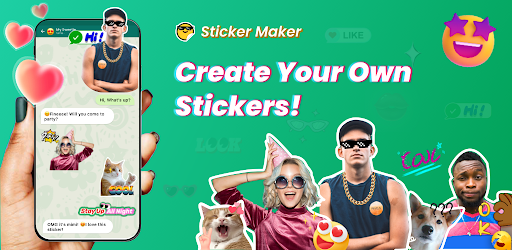
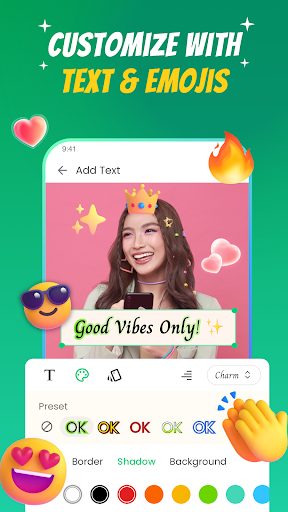
The visual design of Sticker Maker - Sticker Vibe is vibrant and engaging, making the experience of sticker creation enjoyable. The screenshots showcase a clean and intuitive interface, where users can easily navigate through the different features. The app presents various tools for editing stickers, including options for cropping, background removal, and text addition, all of which are visually represented through well-organized menus and icons. The graphics are colorful, enhancing the overall aesthetic appeal of the app. Users can see their creations come to life with animated stickers, which adds an exciting dynamic to the sticker-making process. The ability to import photos and transform them into stickers is visually demonstrated, allowing users to appreciate the potential of their designs before even starting.
Key Features
- Photo Sticker Editor: Effortlessly import photos and convert them into personalized stickers.
- AI Background Remover: Automatically erase backgrounds for clean cuts, making your stickers look professional.
- Customizable Editing Tools: Add text, emojis, and even draw doodles on your stickers for a unique touch.
- Animated Stickers: Create live stickers by turning videos and GIFs into animated creations for WhatsApp.
- Endless Design Options: Choose from various sticker categories, including memes, holidays, pets, and more.
- High-Quality Export: Export your stickers in high definition for crisp visuals in chats.
- Easy Import to Messaging Apps: One-tap import functionality for WhatsApp and Telegram to share your creations effortlessly.
- Unlimited Storage: Organize and store your favorite stickers without limitations.
Mod Features
- Premium Unlocked: Gain access to all premium features without any additional costs, allowing for extensive customization options.
- No Ads: Enjoy an uninterrupted sticker-making experience without annoying advertisements.
- Unlimited Money: Unlock unlimited resources to purchase exclusive sticker packs and enhancements within the app.
- Enhanced Editing Tools: Access advanced sticker editing tools that could include additional filters, effects, and drawing options.
- Exclusive Sticker Packs: Get access to special themed sticker packs that are not available in the standard version.
How to Install APK on Android
Installing the Sticker Maker - Sticker Vibe APK on your Android device is a straightforward process. Follow these steps to get started:
- Enable Unknown Sources: Go to your device's Settings > Security, and enable "Install from Unknown Sources" to allow installation from sources outside the Google Play Store.
- Download the APK: Click on the download link provided below to download the Sticker Maker - Sticker Vibe APK file to your device.
- Locate the File: Using a file manager, navigate to the folder where the APK was downloaded.
- Install the APK: Tap on the APK file to initiate the installation process. Follow the prompts on the screen to complete the installation.
- Open the App: Once installed, locate the Sticker Maker - Sticker Vibe icon on your home screen or app drawer, and tap to open it.
With these simple steps, you can quickly install Sticker Maker - Sticker Vibe and start creating your own personalized stickers in no time!
Call To Action
Ready to bring your chats to life with custom stickers? Download Sticker Maker - Sticker Vibe today and unleash your creativity! Click here to download the app now and start making your own unique stickers!